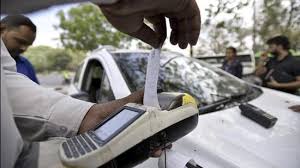
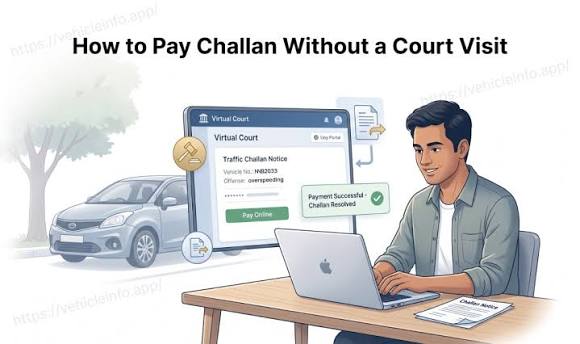
The phrase “sent to court” regarding your traffic challan probably makes you think you’ll need to take time off work, hire a lawyer, and wait around all morning for the court to call your case. However, for qualified challans posted on Virtual Courts, contesting the challan is much easier.
The Virtual Courts system lets you find your case, review the proposed fine and, where permitted, settle it online. If you disagree with the challan, you can request to contest it instead.
It’s important to know where in the eCourt process your challan is located. You should take a different action depending on whether it is an ordinary pending e-challan, or if it is a matter that was transferred to a conventional court or that can be remitted through Virtual Courts. Here’s how you determine the appropriate next action.
Table of Contents
What Is a Virtual Court Challan?
A virtual court challan is a traffic or transport challan handled through the judiciary’s Virtual Courts system. Eligible cases can be resolved electronically without requiring the vehicle owner or an advocate to visit a courtroom simply to pay the fine.
Electronic Court (or eCourt) is an online service that supports the judicial process, which is carried out by a judge. The eCourt platform allows the individual to view the case and respond to it.
For straightforward payment, this generally does not involve joining a video call with a judge. You review the case, complete verification, accept the payment terms and pay through the available gateway. The e-Committee describes this route as one involving admission of guilt or compliance, with eligible matters disposed of after payment.
If you believe that the violation is not valid, you should think carefully about the payment option before making any decisions regarding payment. By using the contest option instead, you will have the opportunity to argue against the validity of the violation.
Also Read: Guide to Avoid traffic Challan in India
How Widely Are Virtual Courts Used?
Virtual Courts already handle a substantial number of traffic challans. A government update published on 7 August 2026 reported the following:
| Measure | Reported figure |
| Virtual Courts established for online adjudication of traffic challans | 31 |
| Challans received by Virtual Courts | 11.33 crore |
This updated information does not represent an ongoing current count; instead, cumulative information published as part of this update reflects the scale of service available through this system and not that all traffic challans throughout the entire nation of India may be processed via an online system.
For an individual driver, availability depends on the jurisdiction, the offence and the case’s current status.
e-Challan, Virtual Courts and eCourts: What Is the Difference?
The names sound similar because the services are connected. Each has a different role.
| Service or stage | What it does | What you should check |
| Traffic e-challan system | Records violations and provides challan-related services | Offence details, payment availability and referral status |
| Virtual Courts | Handles eligible cases electronically through a judicial process | Proposed fine and available payment or contest options |
| Other eCourts services | Support wider court functions, including case information and electronic payments | The service relevant to your assigned court or case |
A payment gateway is another part of this process. It processes the transaction; it does not decide whether the traffic allegation is correct.
The official operating procedure outlines how to integrate the Challan application, the Virtual Courts and payment services. This information is important when attempting to understand how the same case may appear in multiple affiliated products.
Why Has Your Challan Been Sent to Virtual Court?
A court referral does not always mean the challan has simply remained unpaid for a fixed number of days. Some offences are routed for court adjudication through the applicable enforcement process.
Instead of relying on the general statement that every challan goes to court after 60 or 90 days, look at the actual notice and the issuing authority, as well as the reference information and any current notes listed with the entry number associated with the challan.
For example, a challan marked as sent to court may require you to locate the corresponding case before paying. If you cannot find it, ask which court or service is handling it. Searching repeatedly on the original payment page may not answer that question.
What Should You Keep Ready?
Having the relevant information beside you makes the process easier, especially if an OTP or payment session expires.
| Detail or document | Why it is useful |
| Challan number and vehicle registration number | To locate and match the entry |
| Notice or message received | To check the issuing jurisdiction and instructions |
| Registration certificate | To verify vehicle details and access engine or chassis information if requested |
| Accessible mobile phone | To complete the verification offered by the portal |
| Previous payment receipt, if any | To investigate an entry that may already have been paid |
If you intend to dispute the challan, also organise the evidence supporting your objection.
When verifying a challan issued against your vehicle, keep the following in mind: the challan number, case referral number and issue date will help you identify the correct entry when there are multiple entries related to the same vehicle. By doing this, you will not have to worry about selecting the wrong entry and accidentally paying for the wrong one.
Also Read: Documents to Check when Buying a Used Car
How to Check and Pay a Virtual Court Challan
The sequence that is provided below corresponds with the official public-facing procedure. Note that screen labels and payment options may differ, so check the prompts for your particular situation.
Step 1: Open the Official Virtual Courts Website
Access the official Virtual Courts portal, identified by the domain vcourts.gov.in.
Open it independently when checking a notice. Before entering information, confirm that you are on the correct website rather than a similarly named payment page.
Step 2: Select the Relevant Court or Jurisdiction
Choose the appropriate option from the court or jurisdiction menu and select Proceed Now.
Once you have found the issuing information of the challan you will be using for your verification, you should use it to select your state of registration. Your car’s state of registration is only part of your verification process for the alleged violation; you must also make sure that the vehicle was registered in your state during the time of the violation.
Step 3: Search for Your Case
Available search methods include mobile number, CNR number, party name and challan or vehicle number.
You can complete the verification process by entering all the information you have collected about the challan and filling in any captcha information requested on the website. If you do not receive a result after performing one search, double-check all the information entered on the website (including the spelling and selected jurisdiction) before trying additional identifiers.
Step 4: Open the Matching Case
Select View against the correct result. Review the case and challan numbers, offence, vehicle details and proposed fine.
Do this even when the amount looks familiar. Match the identifiers before proceeding, especially if more than one entry appears for your vehicle.
Step 5: Choose the Payment Option
If you accept the allegation and intend to settle the listed fine, choose the option indicating that you wish to pay.
Complete the requested verification. Read any declaration carefully: paying a judicial fine is a decision to settle the case through that route.
Step 6: Complete the Transaction
Review the terms, proceed through Accept & Pay, and follow the payment gateway instructions.
Use a payment method actually offered on that screen. Allow the transaction to finish and return its result before closing the page or starting another attempt.
Step 7: Save the Acknowledgement
After successful payment, download or print the acknowledgement and retain the transaction reference.
The payment confirmation process as described in the Official Manual is dependent on when the funds are realised in accordance with the Official Manual; a confirmation will be sent to the e-Challan system upon realisation. Hold on to your receipt and check the status of the realisation as noted above.
How to Contest a Virtual Court Challan
If you believe the challan is wrong, first identify the specific error. Is the vehicle different? Does the registration number appear to have been misread? Have you already paid the same entry?
Where a Request to Contest is available, the process generally involves:
- Opening the relevant case.
- Selecting the contest option.
- Completing the required verification.
- Entering remarks where requested.
- Reviewing the declarations and submitting the request.
- Saving the acknowledgement showing the assigned court and date.
Initiating a contest starts the procedural route to a regular court. This does not imply that the court has endorsed your contention or reversed the challan. The Rules and Regulations of Virtual Courts also outline that after the initiation of a Contest Request, the ordinary procedure of making payment via the Virtual Courts online service will no longer be applicable to that case.
Prepare your explanation around the evidence. “The photograph shows a different vehicle model” gives a reviewer something concrete to examine. “This challan is unfair” leaves the actual objection unclear.
Keep your RC, relevant photographs, previous receipts and other supporting records together. Follow the assigned court’s instructions about submitting them and attending the proceedings.
What If the Registered Mobile Number Is Wrong?
An inactive number can interrupt verification, but check the available alternatives before assuming you cannot proceed.
The official Virtual Courts FAQ provides the option of making payments or submitting requests to contest decisions based on engine/chassis information when the provided mobile number is incorrect. Please follow all fields and other authentication prompts as displayed; alternative procedures for verifying vehicles do not eliminate any requirement to verify the vehicle in every instance.
The portal also provides a facility to reprint a successful payment acknowledgement, with verification as required.
Use your RC to enter vehicle information accurately. Avoid guessing digits or using details from another vehicle in the household.
After denoting the specific case to related documentation for a driver’s license pertaining to your own vehicle and contact details, it’s possible that a similar lack of communication could arise in the course of future notifications.
Common Virtual Court Challan Problems and What to Do
A problem on screen does not always establish whether a payment failed or whether a case remains payable. Start by identifying what you can actually confirm.
| What you see | What to do next |
| No matching case | Recheck the selected jurisdiction and identifiers; ask the issuing authority about the referral if needed |
| Bank debit but unclear payment result | Preserve the reference and check the case’s payment-verification facility before retrying |
| Receipt available but another portal still shows pending | Compare the challan numbers and follow up with the receipt |
| Payment option missing after requesting to contest | Check the regular-court assignment and acknowledgement |
| Unable to retrieve an earlier receipt | Revisit the case and look for the reprint facility |
| Unclear or conflicting instructions | Contact the support channel or court responsible for that jurisdiction |
Money Debited, but No Clear Confirmation
Do not immediately repeat the transaction. Record the amount, date, time and payment reference, then return to the case.
The public user manual describes a Verify Payment facility for situations where confirmation has not been received or a technical problem occurred. Where displayed, complete its verification and inspect the result.
As for outstanding payments or fines, the Virtual Court system will direct users to the appropriate lower tribunal, the High Court or the State Department of Treasury. The refund and cancellation procedures for Virtual Courts are established by the process used in the High Court; a refund or cancellation cannot be assumed simply because you’ve had second thoughts after submission.
You Need Help With the Case
Use the portal’s Contact Us section to find the relevant jurisdiction’s support details. A state-specific contact is more useful than sending the same query to unrelated offices.
Include the case number, challan number, exact problem and any previous reference. The official contact page lists separate support addresses for participating jurisdictions.
Deadlines, Fine Amounts and Court Visits
Use the date and amount attached to your case. Do not assume that reaching Virtual Court automatically doubles the fine, produces a discount or gives every driver an identical payment window.
If the amount differs from an earlier entry, compare the offence and case details and seek clarification before paying. Keep screenshots of the records you are comparing.
In the same way, just because there is an unresolved payment or fine shouldn’t prevent someone from responding to the notification and asking what action can be taken while the verification process is pursued; the responsible government branch should always be contacted prior to the deadline stated in the notification.
A court visit may become necessary if the case is contested or transferred for further proceedings. Whether you must attend, and how, depends on the court’s directions. If those directions are unclear or the matter is complicated, seek appropriate legal assistance.
Also Read: Paying e-Challan Online – How to Pay Challan Online?
Checking Court Challans Before Buying or Selling a Car
At Spinny, we advise all parties to review a used car’s e-challans before completing the transaction. This service allows you to access the information recorded against a vehicle through its e-challan and compare it with any pending transactions. Spinny also provides court challan and bike challan services.
For a court-related challan, go further than noting the outstanding amount. Identify whether it is awaiting payment, under contest or already resolved. A complaint acknowledgement and a payment receipt establish different things.
A seller should share the relevant reference and closure evidence. A buyer should match those documents with the vehicle and challan number rather than relying on a screenshot saying “payment initiated”.
Both parties involved in the used-car transaction should agree on who will follow up on any outstanding issues. Failure to address these issues before the handover may create unnecessary confusion about how much money was exchanged, what documents were presented and when the transaction will be completed.
Summary
To begin your case, review the current status of your challan, find the proper case and then carefully choose your response after reviewing the allegations against you. If you wish to pay the fine, keep the receipt and confirm the result. If you would like to fight the fine, save the court assignment and follow the instructions on the assignment.
Keeping the challan number, case reference and payment evidence together makes either route easier to manage.
Related Blogs:
Lok Adalat Challan Settlement in Mumbai
Lok Adalat Challan Gujarat
Lok Adalat Traffic Challan Settlement in Haryana
FAQs About Virtual Court Challan
Q. Does a virtual court challan always require a court visit?
No. An eligible case with online payment enabled can be settled through the available payment process. A contested or transferred case may require further participation according to the assigned court’s directions.
Q. Is Virtual Courts the same as a video hearing?
No. The traffic-challan payment process generally involves reviewing a case and responding through the portal. It does not ordinarily require a live conversation with a judge just to complete payment.
Q. Can I check a case without the original SMS?
Yes. Use another available search method, such as the challan number, vehicle number, party name or CNR number. Select the correct jurisdiction and match the result carefully.
Q. Will requesting to contest cancel my challan?
No. It starts the process of having the matter dealt with through the regular court route. Retain the acknowledgement and prepare evidence supporting your objection.
Q. Should I pay again if the bank debited the amount?
First verify the earlier attempt. Check the case record, use Verify Payment where available and preserve the transaction reference. Repeated attempts can make the payment history harder to reconcile.
Q. Should I pay again if the bank debited the amount?
First verify the earlier attempt. Check the case record, use Verify Payment where available and preserve the transaction reference. Repeated attempts can make the payment history harder to reconcile.
Q. Can I expect a discount on a Virtual Court fine?
Do not assume one. Review the amount and instructions displayed for your case. A separate settlement scheme or Lok Adalat process should not be confused with ordinary Virtual Courts payment.
Q. Do I need a lawyer to pay an eligible challan online?
The public-facing payment process is designed for users to complete themselves. For a contested case or questions about a court order, decide whether legal assistance is needed based on the circumstances.