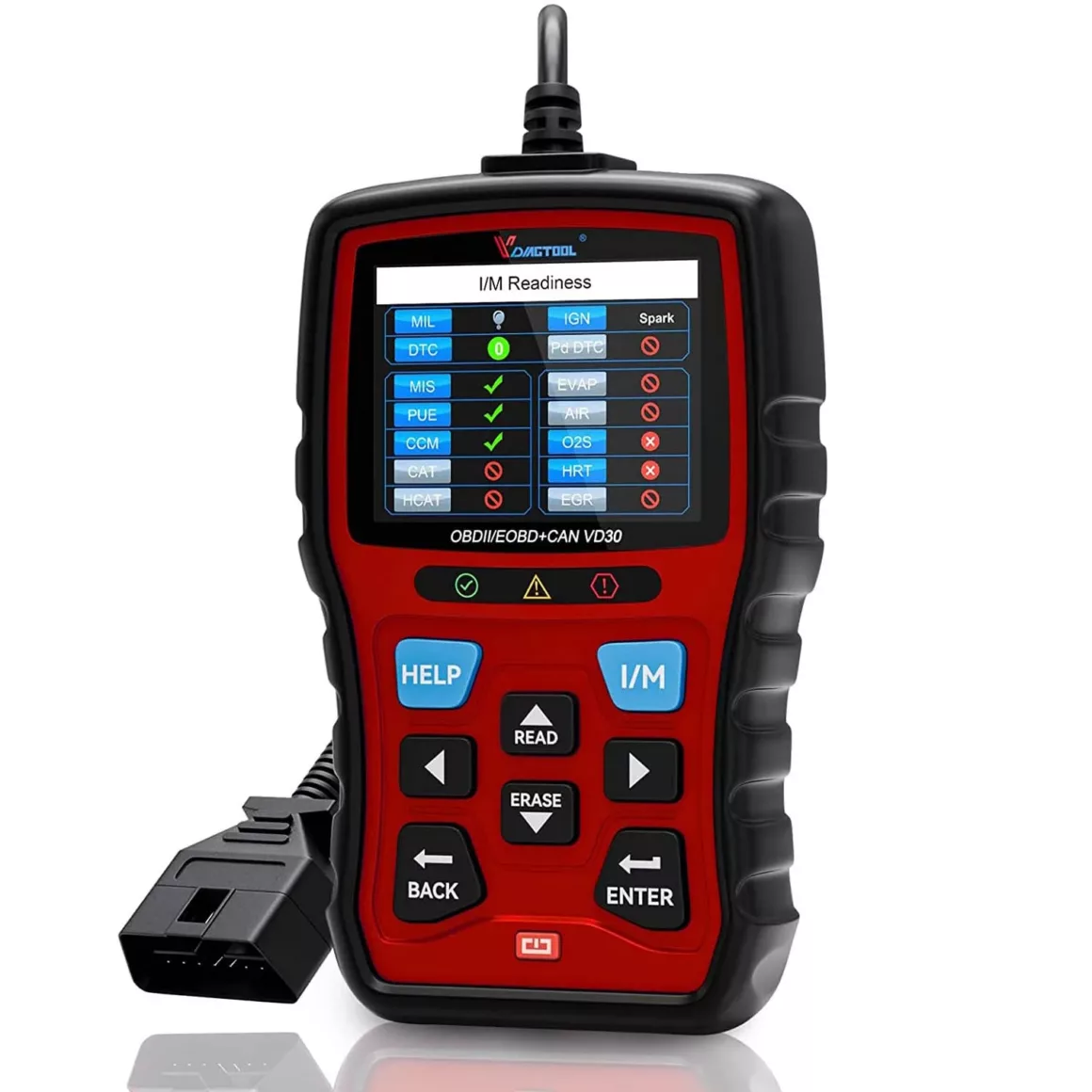
In the age of intelligent engines and onboard diagnostics, an OBD2 code reader is a portable aid for personal mechanics. From pulling a stubborn check engine light to monitoring live data and inspecting a pre-owned vehicle before purchase, an OBD2 scanner deciphers the car’s digital language.
It’s not just a troubleshooting aid, but a tool for intelligent maintenance, improved understanding of your car’s health, and cost savings potentially running to thousands on repair bills.
Why an OBD2 Diagnostic Tool is a Must-Have
- Save Money and Time: Do not pay the garage diagnostic fee. Read and clear fault codes yourself, and find out if you actually need a mechanic.
- Prevent Major Repairs: Catch issues before they become big ones—like imbalances in fuel trim or cylinder misfires.
- Boost Fuel Efficiency: With the capability to see live engine performance data, you can adjust driving and maintenance for peak efficiency.
- Real-Time Performance Insights: View live RPMs, sensor readings, and coolant temperature—all essential for maintaining the engine in optimal condition.
Understanding How OBD2 Works
Vehicles (petrol/diesel) manufactured from 2001 onwards have an OBD2 connector, typically located beneath the dash on the driver’s side. After connection, the diagnostic equipment will communicate with your car’s ECU (Engine Control Unit) and retrieve Diagnostic Trouble Codes (DTCs) and live data (PIDs). Typical types of codes are:
- P-codes: Powertrain issues (e.g., engine misfires)
- B-codes: Body control (e.g,. airbags)
- C-codes: Chassis (e.g., ABS)
- U-codes: Network communications
Livetracing values you can monitor include coolant temperature, throttle position, oxygen sensor, fuel trims, and others, which assist you in identifying faults that may not be triggering a fault.
How to Use an OBD2 Scanner: Step-by-Step
Step 1: Locate the OBD2 Port
In virtually all cars, it’s below the steering wheel, beside the pedals. Insert your OBD2 code reader securely until you hear a click.
Step 2: Power Up the Scanner
Switch the ignition to “on” but do not start the engine. Auto-power scanners are available; some handheld scanners have an “on” button.
Step 3: Read Diagnostic Trouble Codes
Proceed to “Read Codes” or “DTC” on the menu on the scanner. Screenshot or save the code for later use.
Step 4: Look Up Codes
The standard scanners will display the code (e.g., P0171). Good scanners or apps provide definitions. You can also search the internet for your code definition and severity.
Step 5: Clear the Codes (If Appropriate)
Next, clear the codes with the “Erase Codes” command on the scanner. Road-test the truck to ensure the issue is not repeated.
Step 6: Monitor Live Data
Switch to live data mode to display PIDs such as engine RPM, coolant temperature, MAF sensor, and fuel trims in real-time. This indicates whether there is an intermittent fault or how your engine performs under load.
Step 7: Record and Analyze Data
A number of tools have freeze frames with sensor readings from the moment when a fault occurred. You can use this to work out root causes.
Choosing the Right Type of OBD2 Scanner
| Type | Best For | Pros | Cons |
| Basic Code Reader | Simple code read/clear | Affordable, easy to use | Limited features, no live data |
| Handheld Scanner | DIY maintenance & checks | Own display, robust | Slightly bulkier, may lack wireless |
| Bluetooth OBD2 Dongle | Live data on a smartphone | Compact, app-based, shareable | Subscription-based features |
| Advanced Diagnostic Tool | Professional-level needs | Live PID, Bi-directional controls | Expensive, may be overkill for users |
For most users, a Bluetooth dongle paired with a good app offers a great balance of functionality and convenience.
Top Recommended OBD2 Scanners for Indian Users
- Innova 5610: OEM-specific protocols are supported, stores live data, stores codes, with free updates.
- Ancel BD310: An affordable, portable device with live data and test for readiness.
- BlueDriver Pro: Highly-rated Bluetooth dongle with smartphone app and repair guidance.
- XTOOL D7: Highly advanced portable diagnostic tool with ECU coding and pro-level commands.
- Carly OBD2 Scanner: Excellent app support, but some features are subscription-based.
Advanced Features to Look For
- Live Data Streaming: Enables observation of engine parameters in real time.
- Freeze Frame Data: Saves fundamental CRD snapshots around fault occurrences.
- I/M Readiness Check: Checks to see if your car is emissions test ready.
- Bi-directional Controls: Enables you to send out commands like cycling the EGR valve or EVAP purge, for immediate diagnostics.
- ECU Coding Support: Personalize settings on your car, like auto locking/unlocking or brightness levels.
Benefits of Regular OBD2 Use
- Enhanced Safety: Note faults on a recurring basis before they become dangerous.
- Better Resale Value: Deliver customers’ car history or “health reports”—documenting car care.
- Lower Maintenance Costs: Catch tune-up indicators (like spark plug wear) before they become expensive replacements.
- Environmental Compliance: Keep your emissions system healthy, reduce emissions, and pass with flying colors during emissions checks.
Common Mistakes to Avoid
- Ignoring waiting codes without clearing them.
- Code cleaning without resolving issues—this can obscure problems.
- Misinterpreting codes—recognize common symptoms, do not
- Using outdated scanner software.
- Using only simple scanners to deal with complicated issues.
Conclusion
An OBD2 scanner is a minimal expense with big dividends—empowering you to perform basic repairs, monitor engine fitness, and save on garage diagnostics. For DIYers, a good Bluetooth adapter with a good app is an excellent value, and better tools are a worthwhile expense, if you care deeply about car fitness or do fine-level diagnostics. A good tool, used effectively, keeps you one step ahead of trouble, safe on the highway, efficient, and protects your car’s long-term value.
FAQs
Q. Can I use an OBD2 scanner on any car?
Yes—the majority of petrol and diesel cars manufactured post-2001 are OBD2-compliant in India.
Q. How often should I scan my car?
Scan when the ‘check engine’ light appears, or do monthly quick scans to keep an eye on budding issues.
Q. Can I erase fault codes myself?
Yes—if you restore the original cause first. Otherwise, the groove will open up again.
Q. What live data should I monitor?
The key parameters are RPM, coolant temp, readings from the MAF/MAF sensor, and fuel trims for health checks.
Q. Is a Bluetooth dongle safer than handheld OBD2 tools?
Both are safe—if you use reputable, affordable brands and stay up to date with software.