After submitting your application, whether it’s for a transport permit, a driver’s license, or vehicle registration, you may be left wondering, ‘What’s next?’
Well, it’s no longer necessary to endure the anxious waiting game. You can quickly and easily check the Parivahan application status for practically any RTO-related service in real-time with India’s Parivahan portal. No more going to the RTO repeatedly and waiting in long queues. With just a few clicks, you can see the exact status of your application in real-time.
Let’s go over everything you need to know about using Parivahan to track the status of your application.
Why Check Application Status Online?
It can be a guessing game to obtain any official document, let’s face it. You want clarity, though, when it comes to something as important as a driving licence, vehicle RC, or commercial permit. This is the function of the Parivahan application status feature. With the help of this tool, you can stay current without having to deal with duplicate requests, renewals, or new applications.
Using this portal:
- You may schedule your visits if an appearance is required.
- You can expect delivery through the post or an online download.
- You can tell if your application is stuck or requires corrections.
What Can You Track on Parivahan?
The portal allows tracking for a range of services, including:
- Driving Licence Application Status (via Sarathi portal)
- Vehicle Registration Certificate (RC) updates
- Vahan Application Tracking for vehicle-related services
- Vahan Permit Status for transport permits
- Hypothecation removal or vehicle transfer
- Fitness Certificate applications
The Sarathi or Vahan systems, both accessible via the main Parivahan portal, are associated with each service.
How to Check Your Parivahan Application Status Online
In less than two minutes, you can check the status of your application by following these instructions:
Step 1: Go to the Official Parivahan Sewa Website
Begin by visiting the official Parivahan website.
There are two crucial links located under “Online Services” on the homepage:
- Driving Licence Related Services (Sarathi)
- Vehicle Related Services (Vahan)
Select the option that best fits your application.
1. For Driving Licence Applications (Sarathi)
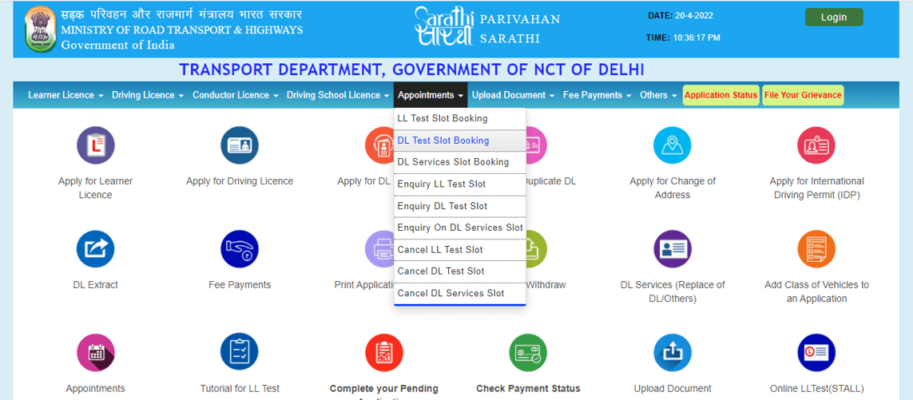
Whether you have submitted an application for a learner’s licence, a permanent DL, or renewal, follow these steps to see your driving licence application status.
Steps:
- Go to https://sarathi.parivahan.gov.in.
- Select your state from the dropdown.
- Click on “Application Status” on the following page.
- Please input your application number, date of birth, and captcha code.
- Click Submit.
You’ll get the immediate status, such as if your test is booked, documents are confirmed, or the license is sent.
2. For Vehicle Services like RC, Permits, Hypothecation (Vahan)
Want to check the RC status online? Or perhaps you want to learn your Vahan permit status? This is for you:
Steps:
- Visit https://vahan.parivahan.gov.in.
- Select “Status” from the navigation menu at the top.
- Choose “Know Your Application Status” or “Know Your Vehicle Details”.
- Enter your application number or your vehicle’s registration number, and the captcha.
- Click Submit.
You’ll see updates like:
- Application received.
- Verification is ongoing.
- Approved and RC dispatched.
- Permit issued or outstanding.
The Vahan application tracking system is particularly useful to commercial vehicle owners and dealers who must manage multiple registrations and permits.
3. Check Status Without Application Number (For RC & Tax)
Forgotten your application number? No need to worry. You may still check the RC status online through your car registration number:
- Go to https://vahan.parivahan.gov.in/vahanservice/vahan/ui/statevalidation/homepage.xhtml
- Click on “Know Your Vehicle Details”.
- Input your car number and captcha
This will indicate the status of your car, such as the validity of your RC, tax paid, fitness certificate, and permit.
Conclusion
No more waiting in line or second-guessing. You can use the Parivahan application status feature to track the permit for your commercial fleet or wait for your first DL.
It only takes a few clicks to access everything from Sarathi Parivahan status checks to Vahan application tracking. Additionally, bookmarking the website will save you time and effort if you’re assisting a friend or family member. The first step to taking charge is being informed.
Therefore, remember to monitor your progress online the next time you apply for an RTO service.
FAQs About Application Tracking on Parivahan
Q. What is the frequency of application status updates?
The status is usually updated within 24 to 48 hours of a new action or as soon as there is any progress.
Q. Is it possible to check the status of my Parivahan application using a mobile device?
Of course. The website works well on mobile devices, and you can save the status by taking a screenshot.
Q. What happens if my status remains pending for an extended period of time?
In such cases, contact your local RTO or check the portal again to see if there are any correction requests.
Q. Can I check my application status without visiting the RTO office?
Yes. You can track the status of your licence, RC, permit, or other services online through the Parivahan Sewa portal. You only need your application number or vehicle number to see the latest update.
Q. Why is my application status showing “under process” for many days?
This usually means your documents are still being verified, or approval is pending at the RTO level. Delays can happen due to workload, missing documents, or correction requests.