











Complete Guide to FASTag Application Process in India

Last updated 7 days ago
FASTag
Last updated 7 days ago

Highways are pretty much the veins of India’s economy; everything from fresh produce to fuel moves through them every single day. To keep these roads in good condition, the government introduced toll tax collection. But as more and more vehicles hit the highways over the years, toll booths started turning into traffic jams, with long lines of cars inching forward just to pay.

To sort out that mess and make life easier for drivers, the government launched FASTag, a simple, contactless way to pay tolls on the go. If you still haven’t got one yet, don’t sweat it. This guide covers everything you need to know about how to apply for a FASTag quickly and easily. Read on, and get your tag fitted so you can glide through those toll plazas without stopping.

What is FASTag?

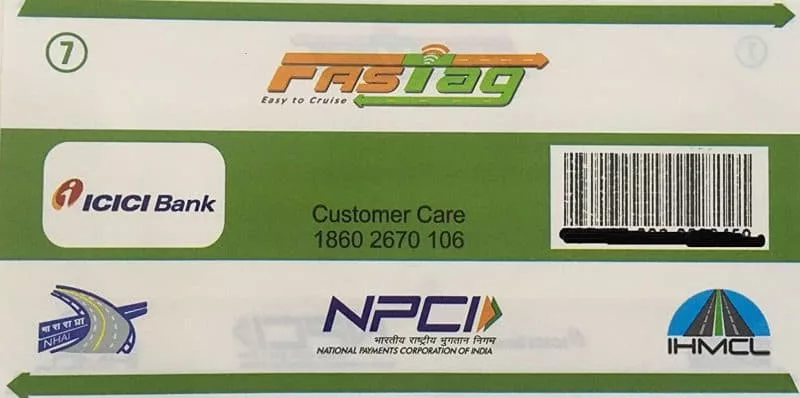
A FASTag is basically a small Radio Frequency Identification (RFID) sticker that lets you pay tolls on highways without stopping for cash. You just load money onto it through apps, and it takes care of the rest.

The whole idea is to make toll collection digital and effortless. The tag is fixed on your car’s windscreen and, as you drive through a toll plaza, scanners on the lane automatically read it. The system then deducts the exact toll amount from your linked FASTag account no coins, no queues, no waiting around. It saves time, reduces congestion, and keeps traffic flowing much more smoothly.

Recharging your FASTag is easy too. You can top it up using PhonePe, Google Pay, Paytm, or even through your debit card, UPI, or net banking; just enter your vehicle details in the app and add money in a few taps.

FASTag is mandatory for all four-wheelers and above on national highways, though state highways haven’t made it compulsory yet. Most toll plazas now have separate lanes for FASTag users and for those still paying in cash, which has made traffic move faster and the entire system far more transparent. For the government, it’s been a real game-changer in how tolls are collected across the country.

Note: Always keep an eye on your FASTag account balance before hitting the highway. If there isn’t enough money in your account, it’s better to switch to a non-FASTag lane at the toll plaza. Driving through the FASTag lane with an insufficient balance can get you penalised, usually by being charged double the regular toll amount. A quick balance check can save you both time and unnecessary extra charges.

FASTag Application Process

Getting a FASTag these days is pretty straightforward, especially if you go online. Most banks and digital payment apps now have a simple option to apply right from your phone. If you’d rather do it the old-school way, you can head to a toll plaza and get it from a Point of Sale counter, or even walk into your bank branch.

You just have to fill out a short form with your vehicle and basic personal details, pay the FASTag fee, and that’s it. Once everything’s processed, the FASTag gets delivered to your address. After you receive it, activate it and stick it onto your car’s windshield — and from then on, you’ll cruise through tolls without stopping.

Also Read: Best FASTag in India: Which One Should You Choose?

How to Apply for the NETC FASTag?

The National Payments Corporation of India (NPCI) has started a National Electronic Toll Collection program (NETC) to digitalise the FASTag application process. Follow these steps to apply for the NETC FASTag via an online process: 

  • Step 1: Open the browser of your phone, tablet, or laptop first. Search for the official website of NETC or enter its URL directly in the search bar of your browser. 
  • Step 2: Once the website opens, you will find the “Apply for NETC FASTag” on the homepage itself. Click on this button to proceed further. 
  • Step 3: You will now have to select the NETC FASTag issuing bank from a dropdown list. You must choose a bank where you already have an account for ease of payment process. 
  • Step 4: Now, you will be automatically directed to your bank’s official netbanking site. Fill in the details such as your name, date of birth, PAN Card Number, mobile number, etc. as per the fields provided in the screen. 
  • Step 5: You will get the option to upload any of your ID proofs to verify your identity. Once all these details are filled and verified, you will receive an OTP on your mobile number. Enter the OTP in the designated field and make the FASTag payment online through the net banking facility provided by your bank. 

Note: The FASTag charges include a security deposit (refundable) and a tag cost. You must also recharge the FASTag with some amount to start using it on the toll booths. 

How to Apply for HDFC Bank FASTag?

You can also apply for the FASTag online directly through HDFC Bank’s FASTag Portal. Follow the below steps to apply for HDFC Bank FASTag:

  • Step 1: Go to the official website of HDFC Bank FASTag Platform. 
  • Step 2: You will find an ‘Apply Now’ button in the homepage. Click on it. 
  • Step 3: First, you will have to provide your mobile number after which an OTP will be sent on the same number. Once the OTP is verified, you will have to enter some more details, including your vehicle and personal details. 
  • Step 4: You’ll be asked to make the payment online through a net banking account or card. Once the payment is received, your application will be processed and you will receive the FASTag on your registered address. 

You can now check your application status using the same portal. 

Note: You don’t have to be an HDFC account holder to apply for the HDFC Bank FASTag. You can apply for a FASTag using their portal and link it with any of your bank accounts (not necessarily HDFC) to connect it with your FASTag account

How to Apply for ICICI Bank FASTag?

If you are an ICICI Bank account holder, you can easily apply for a FASTag through their net banking portal or mobile app. However, if you do not have an ICICI bank account, you can still apply to the ICICI Bank FASTag using the below steps: 

  • Step 1: Go to the official ICICI Bank FASTag Portal. Here you will find the ‘Get FASTag’ button right on the left side of your screen. Click on it to proceed further with the application process. 
  • Step 2: Once you click it, you will be redirected to a new page where you will have to fill-in all the personal details. You will also need to upload your ID proof here. 
  • Step 3: After completing these steps, you will be asked to pay the FASTag fee. After completing the payment, you will receive a confirmation and the FASTag will be delivered to your registered address shortly. 

You also recharge your FASTag account and check all the active toll plazas and active POS locations on the same portal. 

How to Apply for Airtel Payments Bank FASTag?

Airtel Payments Bank also provides the option of applying for FASTag. Follow these steps to get the FASTag through the Airtel App:

  • Step 1: Open ‘Google PlayStore’ or ‘App Store’ on your smartphone. Search for the Airtel Thanks app and download it. 
  • Step 2: Register on this app through your Airtel number. Log in to the app and tap on the ‘Get FASTag’ option. 
  • Step 3: Now, provide all the required details and complete the payment formalities. You will also have to provide details such as your vehicle registration number, information related to your RC, etc. before making the payment. 
  • Step 4: Finally, when the payment is done, you will receive the FASTag on your registered address. 

How to Apply for Axis Bank FASTag?

To get Axis Bank FASTag, you will have to visit a nearby branch and fill out an application form. Along with that, you will also have to submit the necessary documents (identity proofs), registration certificate of your vehicle, and other KYC documents

Then, you can submit the application form and pay the FASTag fee at the counter. Once all these formalities are completed, the bank will send your FASTag directly to your address. 

How to Apply for IDFC FASTag?

IDFC FASTag can be obtained online by following these simple steps: 

  • Step 1: Open your Google Play Store or App Store on your smartphone. Search for the IDFC First Bank FIRSTForward App and download it. 
  • Step 2: Complete the registration formalities after opening the app. Provide your personal and vehicle details in the application form. Pay the FASTag fee and activate your FASTag account
  • Step 3: After verifying your KYC documents and vehicle registration certificate, the FASTag will be delivered at your address. 

Documents required to buy FASTag

Here are the documents required to buy FASTag: 

If you are a KYC-verified customer of a bank, you only need to provide the Registration Certificate (RC) of your vehicle. If you aren’t a verified customer of the bank, you need to provide these documents to verify your identity and address: 

  • PAN Card
  • Aadhaar Card, Voter’s ID, or any other identity proof
  • Utility bills, Aadhaar Card, Passport, or any other address proof
  • Driving License

List of Documents Required for Corporates

You’ll need these documents to get a FASTag for corporates: 

  • PAN Card of the company 
  • Company registration proof for different types of companies such as a private firm, partnership, proprietorship, etc. 
  • Address proof and ID proof of the signing authority 
  • List of partners or directors of the company
  • GST Certificate (if applicable)

Fee for a New FASTag

The different types of costs included in a new FASTag fee are mentioned below: 

  • FASTag issuance fee of Rs. 100 for providing the physical sticker or tag. 
  • A security deposit (Rs. 200 for cars, might be higher for heavier vehicles)
  • A minimum first recharge amount of Rs. 100 has to be paid while applying for the FASTag. 

FAQs about how to apply for FASTag

  1. Q. How can I apply for a FASTag for a commercial vehicle?

    The application process is the same for both private and commercial vehicles. You can either apply online through a bank’s website or NETC’s official site. The offline process involves visiting a bank’s branch or POS of toll plazas and submitting the application with the required documents. 

  2. Q. How can corporate firms apply for a FASTag?

    Corporate firms can follow the same process to apply for a FASTag. However, the set of documents to be submitted for corporates having a fleet of vehicles differs, and the list of documents are provided in the above sections. 

  3. Q. Which form is required to renew the driving license in Chennai?

    Form 9 is required to renew driving license in Chennai. You can download this form from the official site of Parivahan Sewa. Fill out this form correctly and submit the necessary documents to complete the renewal process. 

  4. Q. Is it necessary to pass the driving test while renewing the driving license?

    As per the Tamil Nadu Transport Department’s policies, you don’t have to undergo a fresh driving test if you renew your driving licence within a year after its expiry. However, if you delay the process and try to renew the license after 1 year, you’ll have to undergo a new drive test. If you try to renew the DL after 5 years, you’ll have to apply for a fresh driving license. It also means that you’ll have to undergo the driving test again. 

  5. Q. Can I change or modify my address on DL during the renewal process?

    Yes, you may change or modify your address on DL during the renewal process. Yet, you’ll have to pay an additional fee of Rs. 200 for the same. Also, you’ll have to provide the documents to verify your new address. To change the address, you can use the options provided on the official site of Parivahan Sewa.  

Share

Leave a Comment

Your email address will not be published. Required fields are marked *

A-Z Glossary

Every car part & feature, explained

News

The latest from the automotive world

Best Cars

The crème de la crème of cars

Rules & Regulations

Every law & regulation, explained

Car Ownership

Everyday car-care tips & advice

Buying a car

Make the right buying decision

Selling a car

Make the right selling decision

Miscellaneous

Cars & eveything in-between

5,000,000+ Readers

We’re ❤️ne big family!

Follow us for accurate, impartial & up-to-date information around everything related to cars – Latest news & developments, best options for every budget & lifestyle, ownership tips, buying & selling advice and a lot more on Spinny Magazine.

Unbiased
Rated 4.5 out of 5
Reliable
Rated 4.5 out of 5
Helpful
Rated 4.5 out of 5
Scroll to Top

Want to Sell your Car?

Choose your brand below to get started: